Tuesday, February 2, 2010

Case Studies: Social Networking Sites In Your Business

Case Study: Social Media in Recruitment (Ernst &Young).pdf

Case Study: Increase sales through social media (First Choice Holidays).pdf

Best Web Trends of the Decade - The Web Universe

I had research on how Social Networking Sites can grow your business?, Why giant companies specially focus on and even start campaigns on these social networking sites? So here are some case studies I wana share to show how these sites can helps you....

It's amazing just how much the web has changed in the past ten years. Web trends such as Web 2.0, Enterprise 2.0 and Cloud Computing have revolutionized the way we use the Internet, turning it from a service that we use to extract information into a central part of our daily lives. We use it to keep up with our friends and family, store our vacation photos, make cheap long distance phone calls, watch feature-length movies, play inside of virtual worlds and even carry it around with us in our pocket when we are on the go.


Source: About.com, scribd.com

Monday, February 1, 2010

How to Install Virtual Machine Additions for Virtual PC & Shared Folder

Written by Gil in How-to's

Install Virtual PC Additions

Virtual Machine Additions allow you to extend the capability of Microsoft’s Virtual PC software, however installing these additions can be a little confusing so I decided to post the instructions to install the Virtual Machine Additions for reference. If you have any comments or questions, please post them below.

Note: I used Virtual PC 2007 on Windows Vista.

Install Virtual PC Additions

  • While you are running one of your virtual pcs’, click on Action > Install or Update Virtual Machine Additions (or hit Right Alt + I)

Install Virtual PC Additions

  • You will be prompted with the dialog box above which states that a CD image will be inserted in the Virtual Drive, the CD-ROM contains the installation files for the Virtual Machine Additions. ClickContinue so that the CD-ROM is loaded.

Install Virtual PC Additions

  • The installation will be started in your Virtual PC, click Next to proceed.

Install Virtual PC Additions

The additions install…

Install Virtual PC Additions

  • Once setup is complete, click Finish.

Install Virtual PC Additions

  • Click Yes to restart your Virtual Machine.

Features Available

Improved mouse cursor tracking and control

Install Virtual PC Additions

Greatly improved overall performance

Virtual machine heartbeat generator

Optional time synchronization with the clock of the physical computer

Folder sharing between host and guest operating system

Install Virtual PC Additions

More information on Virtual Machine Additions can be found on Microsoft’s Technet website

Connect Virtual PC to Internet

Written By Clayton James (CJ)

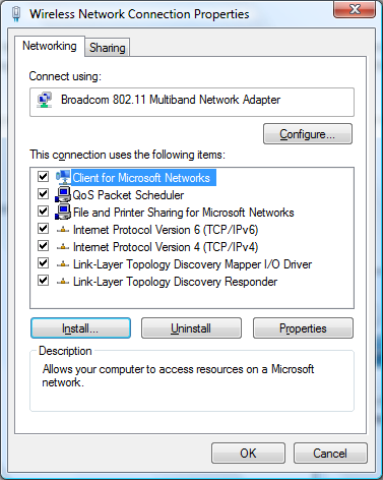
1/ Navigate to your physical network adapter that you want your VPC to use and click the Install button

2/ Highlight Service and click Add

3/ If you don’t see the Virtual  Machine Network Service click Have Disk button (mine displays as I had already added it).

4/ Navigate to the following directory: C:\Program Files\Microsoft Virtual PC\Utility\VMNetSrv and select the VMNetSrv.inf file and Ok your way back out.

5/  This should install the service and you should now see the service in your connection properties

6/ In your VPC make sure you set your network adapter to the adapter that you just installed the Virtual  Machine Network Service

7/ Internet connection from VPC :)

Here is a good blog post for a couple of other issues if Virtual Machine Network Service is installed but you still can’t get network connectivity.

Another good article by Microsoft explaining the virtual machine network settings.

Saturday, January 16, 2010

RCBA Final Presentation (With Video)


Download: FYP Final Presentation With Videos.rar

Sir Syed University of Engineering & Technology

Hi guys! I have uploaded this post for sharing and presenting our project RCBA as sample. If you guys(SSUETian) need any help I welcome you guys. Lolz! i look a “shareef child” / “Shareef bacha” in this presentation. :)

HAPPY SAMPLE NOW! ;)

Note: .rar file include interesting Video files which linked with .pptx

Wednesday, October 14, 2009

Babar Iqbal World’s Youngest MCTS , MCP , CIW-A & CWNA from Pakistan

A 12-year old student Babar Iqbal hailing from Dera Ismail Kahn made a fourth world record in field of computer, Geo News reported Friday.

Earlier, Babar, generally known as genius imagecyber kid, had set up three world records including Youngest Microsoft Certified Professional (MCP) at the age 9 years, Youngest Certified Wireless Network Administrator (CWNA) at the age 9 years and Youngest Certified Web Professional Associate (CIWA) at age 10 years.

While, the recent fourth record he made as Youngest Microsoft Certified Technology Specialist (MCTS) at the age 12 in Dubai.

The participants of this competition were aged from 20 to 35 years. By making this record, young Babar surprised the IT experts from all over the world. He also surpassed his compatriot Irfa Kareem Randhawa, who made this record at the age of 9 years and seven months.

Babar was born in surrounding overwhelmed with computers and monitors on March 2, 1997.

His two brothers and sisters (four in all) are Microsoft Certified Professional.

Website : http://www.babariqbal.com

Blog : http://www.youngestMSP.com

Gallery : http://www.youngestmsp.com/gallery/

Monday, October 5, 2009

Thousands of Hotmail passwords leaked online

More than 10,000 usernames and passwords for Windows Live Hotmail accounts were leaked online late last week, according to a report by Neowin.net, which claimed that they were posted by an anonymous user on pastebin.com last Thursday.

The post has since been taken down.

Neowin reported that it had seen part of the list. "Neowin has seen part of the list posted and can confirm the accounts are genuine and most appear to be based in Europe," said the site. "The list details over 10,000 accounts starting from A through to B, suggesting there could be additional lists."

Hotmail usernames and passwords are often used for more than logging into Microsoft's online e-mail service, however. Many people log onto a wide range of Microsoft's online properties -- including the trial version of the company's Web-based Office applications, the Connect beta test site and the Skydrive online storage service -- with their Hotmail passwords.

It was unknown how the usernames and passwords were obtained, but Neowin speculated that they were the result of either a hack of Hotmail or a massive phishing attack that had tricked users into divulging their log-on information.

Accounts with domains of @hotmail.com, @msn.com and @live.com were included in the list.

Microsoft representatives in the U.S. were not immediately able to confirm Neowin's account, or answer questions, including how the usernames and passwords were acquired. The BBC, however, reported early Monday that Microsoft U.K. is aware of the report that account information had been available on the Web, and said it's "actively investigating the situation and will take appropriate steps as rapidly as possible."

If Neowin's account is accurate, the Hotmail hack or phishing attack would be one of the largest suffered by a Web-based e-mail service.

Last year, a Tennessee college student was accused of breaking into former Alaska governor Sarah Palin's Yahoo Mail account in the run-up to the U.S. presidential election. Palin, the Republican vice presidential nominee at the time, lost control of her personal account when someone identified only as "rubico" reset her password after guessing answers to several security questions.

David Kernell was charged with a single count of accessing a computer without authorization by a federal grand jury last October. Kernell's case is ongoing.

Shortly after the Palin account hijack, Computerworld confirmed that the automated password-reset mechanisms used by Hotmail, Yahoo Mail and Google's Gmail could be abused by anyone who knew an account's username and could answer a single security question.

Thursday, September 10, 2009

CodeIt.Once - Refactoring Add-In for VS 2003 and VS 2005

I'm excited to announce our release of CodeIt.Once - Refactoring Add-In for VS 2003 and VS 2005.

CodeIt.Once functionally complete Beta for both Visual Studio 2003 and Visual Studio 2005 is currently available for download through our Beta Experience program. If you want download a copy for evaluation or to participate in Beta testing, fill out a simple form (name and email address) and we will contact you with download instructions.

Visit CodeIt.Once Refactoring Operations page for complete list of operations and their description.

When released, CodeIt.Once will be offered in a Community Edition (free) as well - the top 6 most frequently used refactoring operations will be available at no charge to VB developers within the VB 2005 IDE.

We consider the Community Edition to be extremely valuable to Visual Basic developers since Microsoft pulled refactoring from VB 2005. CodeIt.Once Community Edition will provide to VB developers the missing in VB 2005 refactorings just like the ones that come right out of the box with C#.


About Refactoring

For those who are not familiar with the term "refactoring", these are things you do every day and may not realize there is a term invented for that :)

Examples of refactoring operations are routine functions like 

  • renaming a variable, fields method, class or namespace
  • moving code fragment of a long method into a separate method
  • promoting local variable to a method parameter
  • moving class from one namespace to another
  • adding, removing method parameters or changing their order

Without automation tool all of the above can be done with the ordinary "search-and-replace" which typically turns into tedious and lengthy (several hours at times) process. The manual process also requires extensive testing to verify that the code still works.

Martin Fowler:

“The key to keeping code readable and modifiable is refactoring - for frameworks, in particular, but also for software in general.
So, what's the problem? Simply this: Refactoring is risky. It requires changes to working code that can introduce subtle bugs. Refactoring, if not done properly, can set you back days, even weeks.“

Here is where CodeIt.Once comes in handy - it will perform these operations for you in the matter of seconds while keep the source code syntactically correct and compilable. CodeIt.Once makes refactoring a snap!


About CodeIt.Once

CodeIt.Once provides the following refactoring commands to start with:

  • Rename
  • Extract Method
  • Encapsulate Field
  • Extract Interface
  • Promote Local Variable to Parameter
  • Remove Parameters
  • Reorder Parameters
  • Add Parameter
  • Method to Property
  • Property to Method
  • Inline Variable
  • Move Class
  • Decompose Conditional

Visit CodeIt.Once Refactoring Operations page for operations description.